Interactive Drive
Interactive Drive is a long-running FlashDreams v2 driving application with scene and variant selection, driving telemetry, post-processing controls, and a BEV minimap.
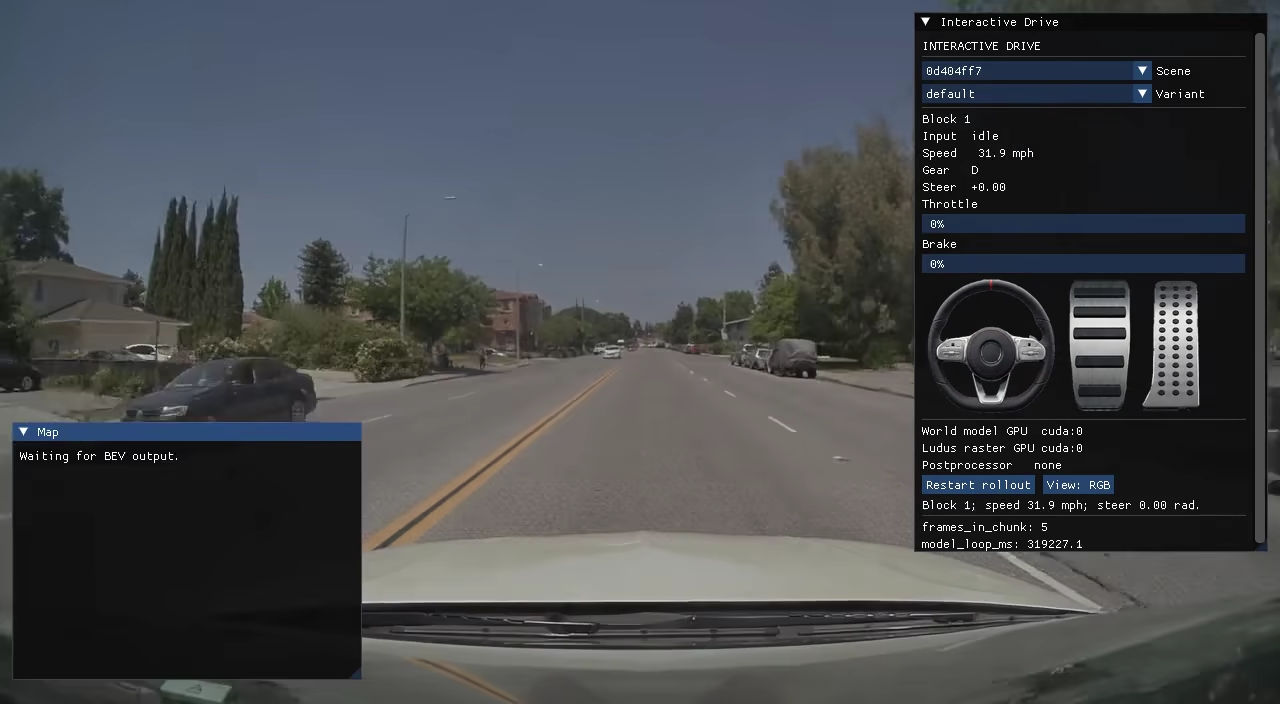
Quick Start:
Controls
Keyboard
| Key | Action |
|---|---|
W or Up arrow |
Accelerate forward. |
S or Down arrow |
Accelerate in reverse. |
A or Left arrow |
Steer left. |
D or Right arrow |
Steer right. |
| Space | Brake; while held, throttle is suppressed. |
1 |
Show the RGB view. |
2 |
Show the HD-map conditioning view. |
3 |
Show the PhysX collider view. |
Controller
Standard-mapped gamepads use these controls:
| Control | Action |
|---|---|
| Left stick, push forward+tilt | Steer. |
| Right trigger | Accelerate in the selected gear. |
| Left trigger | Brake. |
R (hold) |
Select reverse gear; releasing returns to Drive. |
Start / + (Plus) |
Restart the current rollout. |
View selection does not currently have controller bindings. No other gamepad sticks, axes, or buttons are used. A connected steering wheel uses its steering, throttle, and brake inputs directly.
Steering wheel setup
Calibrate a wheel and pedals with:
uv run --package flashdreams-interactive-drive-v2 interactive-drive-configuration
Interactive Drive loads the default profile on later launches. One profile can
bind a wheel and separately connected pedals. Force feedback requires write
access to /dev/input/* and the appropriate Linux driver:
| Vendor | Driver |
|---|---|
| Thrustmaster | hid-tmff2, plus hid-tminit or tmdrv for wheel-mode initialization |
| Fanatec | hid-fanatecff, with the base in PC mode |
| Logitech | In-kernel hid-lg4ff, new-lg4ff, or the HID++ driver for the G920 and Xbox/PC G923 |
Its InteractiveDriveUILoop HUD contains steering-wheel and pedal sprites.
Dear ImGui builds the immediate-mode HUD and SlangPy renders it with GPU
textures; the application does not use CSS.
The package also owns its model-neutral scene loading, simulation, rendering, input handling, and wheel-configuration support. Its world-model binding is supplied by an integration adapter.
Demo Arguments
| Argument | Description |
|---|---|
--scene PATH |
Use a local USDZ scene instead of downloading the default scene. |
--prompt TEXT |
Override the prompt stored in the selected scene variant. |
--camera NAME |
Select a camera from the scene. Default: camera_front_wide_120fov. |
--variant NAME |
Select the scene's initial-frame and prompt variant. Default: default. |
--total-blocks N |
Stop after this many generated blocks; 0 runs until the session is stopped. Default: 0. |
--fps N |
Set the application frame rate. Default: 30. |
--width N |
Set the output width. The selected demo-model slug supplies the default. |
--height N |
Set the output height. The selected demo-model slug supplies the default. |
--view {rgb,hdmap,physx} |
Select the initial RGB, HD-map conditioning, or PhysX collider view. Default: rgb. |
--no-ui |
Present model output directly without creating the HUD or rendering its BEV minimap. |
--game-mode |
Enable the speed limit and collisions with scene actors and static map geometry. |
--postprocess-preset NAME |
Start with a registered video post-processing preset enabled. Default: none. |
--postprocess-device DEVICE |
Select the postprocessor device independently. Default: cuda:0. |
--world-model-device DEVICE |
Select the model device. Default: cuda:0. |
--raster-device DEVICE |
Select the Ludus raster device independently. Default: cuda:0. |
--world-model-seed N |
Pin the seed used for each rollout. |
--world-model-debug-condition-frame-dir PATH |
Override first-chunk condition frames for debugging. |
For example, use the default scene, select its rain variant, override its prompt, and enable RTX super resolution:
uv run flashdreams-run-v2 DEMO_MODEL_SLUG --mode webrtc -- \
    --variant rain --prompt "A rainy night drive" \
    --game-mode --postprocess-preset rtx-super-resolution
For example, render every generated frame once, in order, with the HUD disabled (for quality evaluation):
uv run flashdreams-run-v2 DEMO_MODEL_SLUG \
    --mode mp4 --output-path artifacts/test/interactive-drive.mp4 \
    --timeout unbound \
    --backpressure-mode block --presentation-mode on_demand -- \
    --no-ui --total-blocks 60
This is frame-lossless presentation: the runtime neither drops nor repeats generated frames. The MP4 itself is currently encoded as H.264 at CRF 18, so it is not mathematically lossless at the pixel/codec level.
For example, render a native-window with game-mode collisions enabled:
uv run flashdreams-run-v2 DEMO_MODEL_SLUG --mode native-window -- \
    --game-mode
The HUD's view button cycles through RGB → HDMAP → PHYSX.
When --postprocess-preset is set, the preset starts enabled and the HUD's
Post-processing checkbox can toggle it between generated chunks. Without a
preset, the checkbox is hidden. Run the application-help command above to see the presets registered in the
current environment. The built-in rtx-* presets require
the optional NVIDIA VFX dependency, installable with
uv pip install 'flashdreams[rtx-postprocess]', and supported RTX hardware.
The downloaded default scene is
scenes/clipgt-0d404ff7-2b66-498c-b047-1ed8cded60d4.usdz. Pass
-- --scene scene.usdz to use a local scene instead.
Tests
uv run --no-sync pytest apps/interactive_drive -m ci_cpu -v
Logging
set LOGURU_LEVEL to DEBUG to see more logging. Default is INFO.